
Description
Welcome to the Microsoft 365 Copilot app.
Microsoft 365 Copilot (formerly Office) lets you create, share, and collaborate in one place with your favorite apps, now including Copilot.*

Microsoft 365 supports you.
Find your favorite apps, files, and sources of inspiration using the Microsoft 365 Copilot web application.

New updates in Microsoft 365
Starting January 17, 2025, Microsoft officially integrates the intelligent virtual assistant (AI) Copilot into two products: Microsoft 365 Personal and Microsoft 365 Family.
Create anytime, anywhere, with any app.
Quickly design anything for you and your family—birthday cards, school flyers, budgets, social media posts, videos, etc.—without any graphic design experience.

Store with confidence
Your files and memories are secure in the cloud with 5GB of free storage and 1TB when you sign up for a paid Microsoft 365 subscription.

Find and share with friends…
…even if they don’t have Microsoft 365. Collaborate and create files easily with friends and family.

Protect your personal data.
Stay safer online with continuous threat monitoring, multi-device alerts, and expert tips and guidance from Microsoft Defender.

More apps in one place
The Microsoft 365 Copilot app combines your favorite apps and Copilot in one intuitive platform.

[*] Copilot in Microsoft 365 app. Copilot is available to Microsoft 365 Enterprise, Academic, and SMB subscribers with work or education accounts.
Microsoft 365 Personal and Family subscribers and free accounts can access Copilot at copilot.microsoft.com and on the Copilot mobile app
[**] A Microsoft 365 Personal or Family subscription is required.
What is Copilot? Where is it integrated?
Copilot is an AI-powered assistant developed by Microsoft that can help users work faster and easier. Simply communicate your requests to Copilot using commands (prompts), and Copilot will execute them.

Microsoft Word
AI Copilot in Word will support:
• Summarize, create new, or rewrite content as required.
• Add detailed content and remove unnecessary information as required.
• Adjust your writing style and expression accordingly (simple, professional, logical writing style, etc.)
• Suggestions for adjusting grammar, sentence structure, etc.
Microsoft PowerPoint
AI Copilot in PowerPoint will support:
• Create a new presentation with pre-generated notes powered by AI.
• Add slides or adjust the presentation as needed.
• Transform Word documents into eye-catching presentation slides
• Suggest a clear and engaging presentation layout.
• Adding images, charts, and videos makes the presentation more engaging.
Microsoft Excel
AI Copilot in Excel will support:
• Analyzing, summarizing, processing, organizing, and filtering data
• Assists in formula creation and suggests suitable visual graphs and charts.
• Conduct in-depth data analysis and make trend predictions.
• Change the formatting to highlight the data.
Outlook
AI Copilot in Outlook will support:
• Draft clear, concise emails with complete information.
• Summarize long email threads into key information
• Adjust the wording, vocabulary, and sentence structure to suit the requirements.
Microsoft Designer
AI Copilot in Designer will support:
• Simple image creation and design based on requirements.
• Image editing features such as object removal, background blurring, etc.
• Use the templates available in Designer’s effects library to make your images more impressive and appealing.

Maximize everyone’s potential with Microsoft 365 Family.
Get digital security, secure cloud storage, and innovative apps that you and your family can access across multiple devices – all in one package.

Microsoft 365 Family
- Applications such as Word, Excel*, PowerPoint, and Outlook* are integrated with AI assistants* (Copilot) that support searching, summarizing, creating, or editing content according to user preferences – helping to complete all tasks extremely quickly.
- Both NEW and RENEWAL products are accepted (Renewals are possible for up to 5 years).
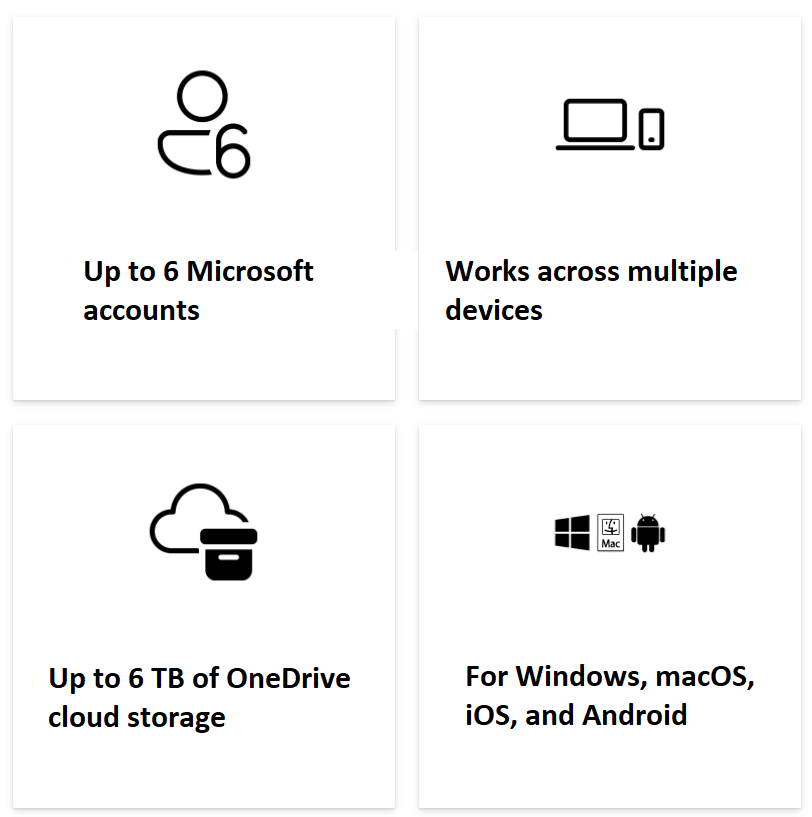
- This 12-month subscription plan supports 1-6 users (up to 6 Microsoft accounts).
- The software includes Office applications: Word, Excel, PowerPoint, Outlook, OneDrive, etc.
- Up to 6 TB of OneDrive cloud storage (1 TB of separate personal storage per person).
- Install it simultaneously on up to 5 devices/users – including: PC, Mac, iPhone, iPad, as well as Android phones and tablets*.
- The application is continuously updated with the latest features and versions throughout its usage.
- The license period for the 6 users applies from the time the first user is activated.
- This product is not eligible for exchange or return.
- Supported operating systems: • Windows • MacOS • Android • iOS
*iOS and Android require separate app downloads.
*Only administrators or subscription owners can use the built-in AI features. Limitations on AI feature usage apply (see: https://go.microsoft.com/fwlink/?linkid=2280151). AI features may support different functionality depending on the application/device/language platform.
*To use AI Copilot in Excel, users must enable “AutoSave,” meaning the file must be saved to OneDrive.
*AI Copilot in Outlook applies to accounts with email addresses @outlook.com, @hotmail.com, @live.com, or @msn.com and is available in Outlook.com.
Key benefits
Get online protection tools, secure cloud storage services, and innovative applications designed to suit your needs, all in one package.
Includes premium value

Summary of benefits

Recommended for families or small groups.
Share all the benefits of Microsoft 365 with up to five other users. Sharing means each person can flexibly use their own apps and cloud storage across multiple PCs, Macs, iPhones, iPads, and Android phones and tablets. (Separate apps are required for iOS and Android.)

Up to 6 TB of cloud storage (1 TB per person)
Each person you share the subscription with will receive 1 TB (1,000 GB) of secure storage for files, photos, videos, emails, and other content. Additionally, everyone can easily manage their storage anytime, on any device.

Protecting personal data and devices.
Everyone can easily manage their digital security and anticipate online threats with Microsoft Defender’s advanced protection features for their favorite devices.

Store photos and files securely.
Each person can securely store photos and files in their personal OneDrive with the built-in file recovery feature. Access files from any device. (In the event of a malicious attack, file corruption, or accidental deletion and modification, users have up to 30 days to recover their OneDrive files.)

Powerful applications to help you increase productivity.
Word, Excel, PowerPoint, and OneNote are integrated to help everyone collaborate in real time and work offline. Get design, writing, and speaking suggestions within each application. In addition, users have access to a diverse collection of royalty-free creative content, including templates, archived images, icons, and fonts.

Secure email with no ads.
Everyone can use Outlook to manage multiple email accounts, calendars, to-do lists, and contacts with built-in security tools to protect their information. (Security features apply to @outlook.com, @hotmail.com, @live.com, or @msn.com email addresses.)

Supports advanced spell checking, grammar checking, and text editing.
Confidently create documents, emails, and web content with Microsoft Editor – complete with features to help you and your family improve spelling, grammar, and writing style.

Video editor with advanced filters and effects
Easily create and edit stunning videos with Clipchamp’s powerful tools, user-friendly interface, and extensive templates and libraries. (Templates are only available in English.)

The applications are always updated.
With a Microsoft 365 Family subscription, everyone always has access to the latest and most advanced features and updates as soon as they’re released. This ensures that the applications you and your family use are always the best and newest.

Microsoft Support
We’re always ready to assist you with our Microsoft 365 and Windows 11 technical support team, available to help you and your family whenever you need us, via chat or phone.

Publisher (PC only)
Create everything from simple greeting cards and labels to professional newsletters and posters.

Access (PC only)
Easily create and manage databases for projects of all sizes.

Make video calls all day with Microsoft Teams.
Everyone can join group calls and chats for up to 30 hours with up to 300 people using Microsoft Teams.

60 minutes of Skype call
Stay connected with friends and family via their mobile or landline phones with 60 minutes of Skype calls per month. (60 minutes monthly. Skype account required. Excludes special, premium, and non-geographic numbers. Calls to phones are only available in select countries. Skype calling minutes are only available in certain countries and require activation. Exclusions apply. See microsoft365.com/info )

Security gives you peace of mind.
Easily protect your most important content with Microsoft 365. Stay safer online, and keep your data and devices safe while browsing with Microsoft Defender. Documents, photos, and videos stored on OneDrive can be accessed on any device. Seamlessly manage your various email accounts, calendars, and contacts in Outlook, and get automatic attachment scanning and link checking to detect potential email threats before you click.
General information
– 1-year subscription
– Install on 5 PCs or Macs, 5 tablets (e.g., iPads or Android or Windows tablets), and 5 smartphones.
– Complete installation versions of Word, Excel, PowerPoint, Outlook, and other applications, in Office 2016.
– 60 minutes of Skype per month and 1TB of cloud storage for one year.
– Updates are available at no extra cost.
Outstanding

Protect what matters: Download security apps and privacy features designed to help keep you safer online. Microsoft Defender lets you seamlessly protect your personal data and favorite devices. OneDrive helps you store documents and photos securely, with access from anywhere.

Become a creative expert: Download apps, features, and templates designed to help you create high-quality content quickly. Easily create eye-catching videos for any event with Clipchamp. Footnote3: With Word, draft outstanding documents with high quality. Microsoft Editor helps reduce spelling errors and improve grammar anytime, anywhere. Easily create spreadsheets for budgeting, planning, calculations, and more with Excel. PowerPoint lets you design beautiful slides and learn tips to help you confidently present.

Focus on what matters: Download apps and features to help you stay organized and on schedule with Microsoft 365. Outlook lets you check all your email addresses in one place and manage multiple calendars in a single interface. With OneNote, collect, organize, and share your ideas with a digital notebook. Microsoft Teams lets you call, chat, plan, and meet online with loved ones—all in one app. Plus, you can easily share lists with others to get things done together.

One solution for your multiple devices: Download apps that work seamlessly across five of your favorite devices—Mac, PC, phone, and tablet.
TYPES OF MICROSOFT 365 FAMILY SOFTWARE
Microsoft 365 Family ESD: Electronic Software Delivery (ESD) is a great addition to the physical FPP box format. ESD allows software to be distributed digitally (called an electronic key) directly to customers. This is the fastest way for end users to purchase licenses.
MAIN FEATURES
 Edit without printing with Ink Editor: Easily select, highlight, and erase text – all with a pen.
 Review the idea generation process with Ink Replay: Follow your partner’s strokes to understand the concept behind the pen.
 Get started quickly with QuickStarter: Receive outlines and introductory slides to quickly begin creating.
 Create animations with just one click using Morph: Add an element of surprise to your presentations by easily creating slide transition animations.
 Search easily with Researcher: Find content and insert it into your document – without leaving Word.
COMPARING MICROSOFT 365 WITH OFFICE
| Microsoft 365 Family | Microsoft 365 Personal | Office Home & Student 2021 | |
| Number of users | 1-6 people | 1 person | 1 PC or Mac |
| Number of accounts | 1-6 | 1 | 1 PC or Mac |
| Cloud storage | Up to 6 TB (1 TB per person) | 1 TB | |
| Multiple devices and platforms |  |
|
|
| Word, Excel, PowerPoint | |
|
|
| Outlook | |
|
|
| Ongoing technical support | |
|
|
| Microsoft Defender | |
|
|
| Microsoft Family Safety | |
||
| Microsoft Editor | |
|
|
| Clipchamp | |
|
|
| Microsoft Teams | |
|
|
| OneNote | |
|
|
| Access (PC only) | |
|
|
| Publisher (PC only) | |
|
|
| Microsoft Forms | |
|
|
| Skype | |
|

Reviews
There are no reviews yet.